





Trello and Asana are two of the most popular project management tools, and are often compared for their ability to help teams organize, track, and deliver work efficiently. Both platforms promise efficient collaboration and smoother workflows, but they cater to very different needs.
Trello shines with its simple, visual Kanban boards that make tracking tasks intuitive and engaging. Asana, on the other hand, offers a more structured approach, with multiple project views, dependencies, and automation tools that make it ideal for complex, multi-team projects.
In this Trello vs Asana comparison guide, we will explore these tools’ features, pricing, ease of use, and integrations. By the end, you’ll have a clear understanding of which project management tool best fits your team’s goals, workflows, and budgets, irrespective of whether you’re managing a solo project or leading a large organization.
Key Takeaways: Trello vs Asana
- Asana stands out for its structured task management and automation capabilities. Features like custom fields, dependencies, workload tracking, and AI-driven insights enable teams to manage complex projects with precision. This makes it ideal for organizations seeking scalability and data-driven decision-making. Sign up for Asana’s free plan to try its features firsthand at no cost.
- Trello’s intuitive Kanban boards and flexible Power-Ups make managing projects effortless. Its visual layout offers complete workflow visibility, which is ideal for project managers who value simplicity and quick setup. Create a free Trello account and experience its benefits for yourself, completely risk-free.
- Trello offers a more friendly entry point with plans starting from $5/user/month. Its free plan is also quite generous as it supports up to 10 boards per Workspace and unlimited cards. Asana’s pricing begins at $10.99 per user/month, but includes Asana AI, custom fields, and Timeline and Gantt Chart views.
Trello vs Asana: At a Glance
| Tool/ Feature | Trello | Asana |
| Ease of Use | ⭐⭐⭐⭐⭐ Simple, visual kanban interface with minimal learning curve | ⭐⭐⭐⭐ More structured interface with a slightly steeper learning curve |
| Pricing | ⭐⭐⭐⭐ Starting from $5/user/month | ⭐⭐⭐ Starting from $10.99/user/month |
| Task Management | ⭐⭐⭐⭐ Flexible boards and checklists; great for visual tracking and basic task management | ⭐⭐⭐⭐⭐ Supports dependencies, custom fields, and recurring tasks; great for advanced and complex tasks and projects |
| Team Collaboration | ⭐⭐⭐ In-card comments, file attachments, and integrations | ⭐⭐⭐ In-task comments, integrations, and a centralized inbox to keep teams aligned |
| Workflow Automation | ⭐⭐⭐⭐ Rule-based automation through Butler and automation through third-party apps | ⭐⭐⭐⭐ Rule-based automation and automation through third-party apps |
| Communication | ⭐⭐⭐ Uses comments and Power-Ups for communication; integrates with Slack and Teams. | ⭐⭐⭐⭐ Centralized messaging, project discussions, and Slack/Zoom integrations for real-time collaboration |
| Integrations | ⭐⭐⭐⭐ “Power-Ups” system connects Trello with tools like Google Drive, Slack, and Jira | ⭐⭐⭐⭐⭐ 200+ native integrations plus API and automation support with platforms like Zapier and Make |
| AI Capabilities | ⭐⭐⭐⭐ Features Rovo, Atlassian’s AI writing assistant, which is available via paid plans | ⭐⭐⭐⭐⭐ Asana Intelligence offers built-in task summaries, insights, and automation for paid users |
| Reporting and Analytics | ⭐⭐⭐ Basic dashboard and Power-Ups; good visual overview but limited customization | ⭐⭐⭐⭐ Advanced, customizable dashboards and AI-powered analytics for actionable insights |
| Security and Privacy | ⭐⭐⭐⭐⭐ Enterprise-grade encryption and compliance via Atlassian’s Trust Center | ⭐⭐⭐⭐⭐ Full encryption, MFA, SSO, and certifications like ISO 27001 and SOC 2 Type II. |
| Customer Support | ⭐⭐⭐⭐ Community forums, help center, and email/ticket support via Atlassian | ⭐⭐⭐⭐ Live chat and email support for paid users; strong self-help resources |
Trello vs Asana Pricing:
Both tools provide free plans, but Trello’s is more generous, allowing up to 10 collaborators per workspace, up to 10 boards per workspace, unlimited cards, 250 Workspace command runs per month, and unlimited Power-Ups per board. Start your Trello free plan today. Meanwhile, Asana’s free plan only supports up to 2 users, List, board, and calendar views, unlimited projects, and tasks. Get started with the Asana free plan to experience its core features at no cost.”
When it comes to paid plans, Trello offers better value than Asana for small teams that need visual task tracking. Its pricing starts at $5 per user/month for the Standard plan, and comes with advanced boards, checklists, and automation. Its rates scale to $10 for Premium and $17.50 for Enterprise, which include enhanced security and admin controls.
Meanwhile, Asana’s pricing begins at $10.99 per user per month for the Starter plan, $24.99 for the Advanced plan, and the Enterprise plan with custom pricing. Paid plans introduce Timeline and Gantt charts, Asana AI, eliminate user seat limits, allow unlimited free guests, and unlimited automations.
Nonprofit and education discounts are available on both platforms. Trello offers up to 75% off for eligible nonprofits, while Asana provides 50% off for nonprofits. Explore our comprehensive guide to Asana Pricing to learn more.
Verdict: Trello’s straightforward pricing makes it easy to scale gradually. Meanwhile, Asana’s higher tiers cater to larger organizations needing advanced automation, reporting, and structured project management. Overall, Trello’s affordability gives it a clear edge for budget-conscious teams.
Accessibility and User-Friendliness
Trello and Asana provide web, desktop, and mobile access across Windows, macOS, Android, and iOS devices. Trello’s desktop apps mirror the browser experience, while Asana’s apps deliver full project visibility on any device. This cross-platform accessibility ensures teams can stay connected and productive wherever they are.
Both platforms are designed for ease of use, supporting quick adoption and efficient project management. Trello emphasizes simplicity through its intuitive Kanban board view design, enabling users to create, organize, and manage tasks visually with minimal onboarding. Asana, on the other hand, balances flexibility with structure, offering customizable project views and clear task organization for collaborative teams.
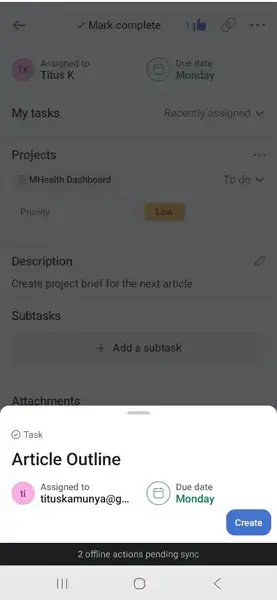
Moreover, both Asana and Trello support offline access. During my test on Asana, I was able to create, complete, and comment on tasks offline on the mobile app, with all changes syncing once I reconnected to the internet. Trello’s mobile app allows users to view and make limited updates to boards offline, which automatically sync when internet access is restored.
Trello vs Asana Core Features
Both Trello and Asana excel at helping teams plan, organize, and track work. However, each of these project management solutions approaches its workflow in distinct ways. Trello emphasizes visual simplicity and flexibility through its Kanban-style boards. Meanwhile, Asana provides structured workflows suited for managing complex projects.
In this section, I’ll compare how each project management solution performs across key features.
1. Project Management
Both Trello and Asana help teams plan, organize, and execute projects effectively. Each platform allows users to create projects, assign tasks, track progress, and visualize workflows through customizable views. On both, users can create projects from scratch or use the customizable project templates.
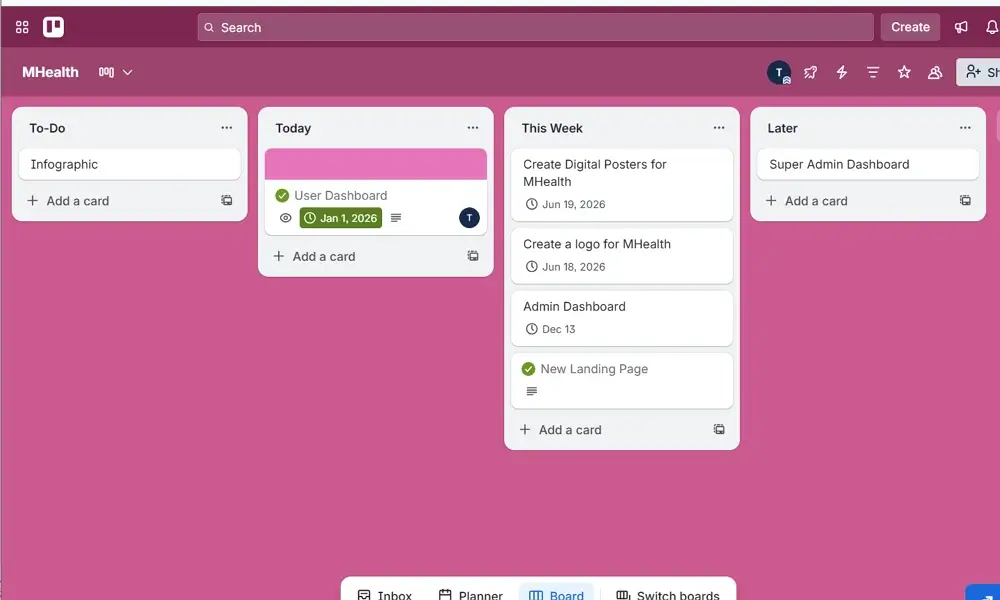
On one hand, Trello centers around its visual Kanban board, where users can drag and drop cards to track progress. Paid tiers add Calendar, Table, Timeline, and Dashboard views for broader visibility.
Asana, on the other hand, offers List, Board, Calendar, and Timeline views by default. This gives teams flexible ways to manage projects of varying complexity. While Trello’s layout favors visual simplicity, Asana’s multi-view system offers greater structure and customization for complex projects.
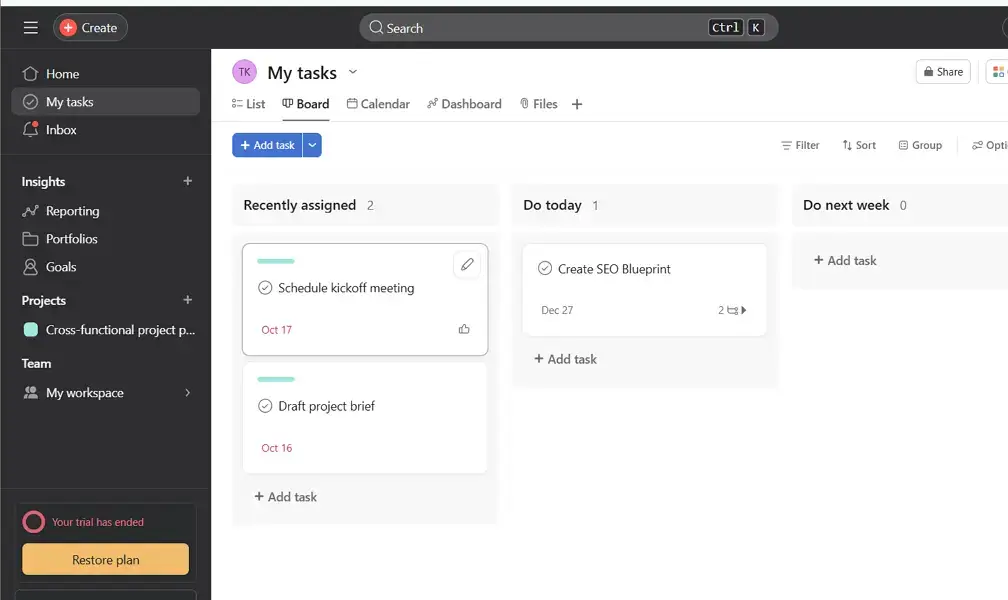
Project views aside, Asana includes a built-in Workload feature that lets managers view each team member’s capacity. This ensures tasks are distributed evenly. Trello, on the other hand, lacks a native workload tracker, but teams can achieve similar insights by integrating Power-Ups. That said, Asana’s native capabilities make it stronger for teams managing multiple projects or departments.
Another key project management feature that these two platforms have is the ability to set milestones. On one hand, Asana allows teams to set milestones, track progress, and align them with larger company objectives through its Goals and Portfolios tools. On the other hand, Trello users can track milestones by customizing cards, using checklists, or adding Power-Ups.
Verdict: Asana offers complete control and a full-blown project management experience. Its variety of project views, integrated workload tracking, and goal alignment tools make it ideal for teams managing multiple deliverables and dependencies. Trello remains a strong choice for small teams or individuals who value visual clarity and a lightweight, flexible setup.
2. Task Management
Both Trello and Asana enable users to create, assign, and track tasks easily. Each of these project management solutions allows users to add due dates, descriptions, attachments, and comments, ensuring that all task information stays centralized. However, the platforms approach task management differently.
In Trello, tasks are represented as cards on a board. Each card can include checklists, attachments, comments, and assigned members, making it easy to see ownership and status.
Meanwhile, Asana offers similar functionality but adds a structured hierarchy with tasks, subtasks, and sections. It also lets users assign multiple collaborators, which supports complex workflows.
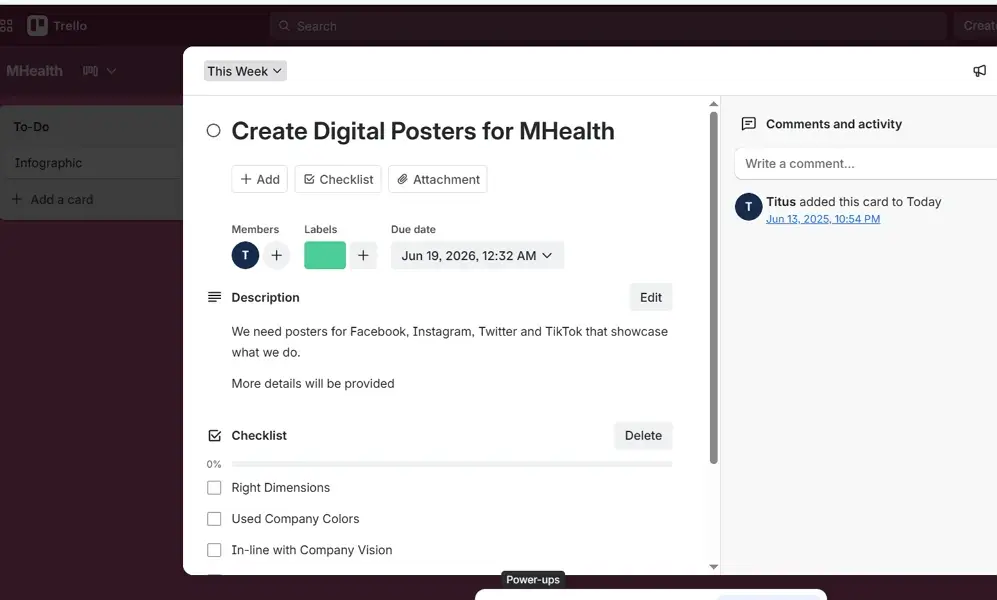
Also, Asana provides more robust task management tools like dependencies, recurring tasks, and follow-up tasks. This helps organize complex projects and automate repetitive work. Meanwhile, Trello relies on Power-Ups to achieve similar outcomes like dependency management or recurring cards.
That said, both platforms send real-time notifications for updates such as due dates, task assignments, and comments. Trello uses in-app alerts and email notifications to keep users up-to-date. Asana, on the other hand, offers more granular control, allowing users to customize notifications, receive inbox summaries, and integrate alerts via Slack or email. This flexibility helps teams manage updates without overload.
Verdict: Asana wins in task management due to its advanced, built-in capabilities like task dependencies, recurring tasks, and customizable fields. Trello excels in simplicity and visual clarity, making it perfect for individuals or small teams. Meanwhile, Asana’s deeper functionality supports complex, interconnected workflows and larger teams requiring structured task control.
3. Workflow Automation
Trello and Asana support workflow automation to help teams eliminate repetitive tasks and maintain consistent processes. Each tool allows users to trigger actions automatically based on set conditions like updating task statuses, assigning team members, or sending notifications.
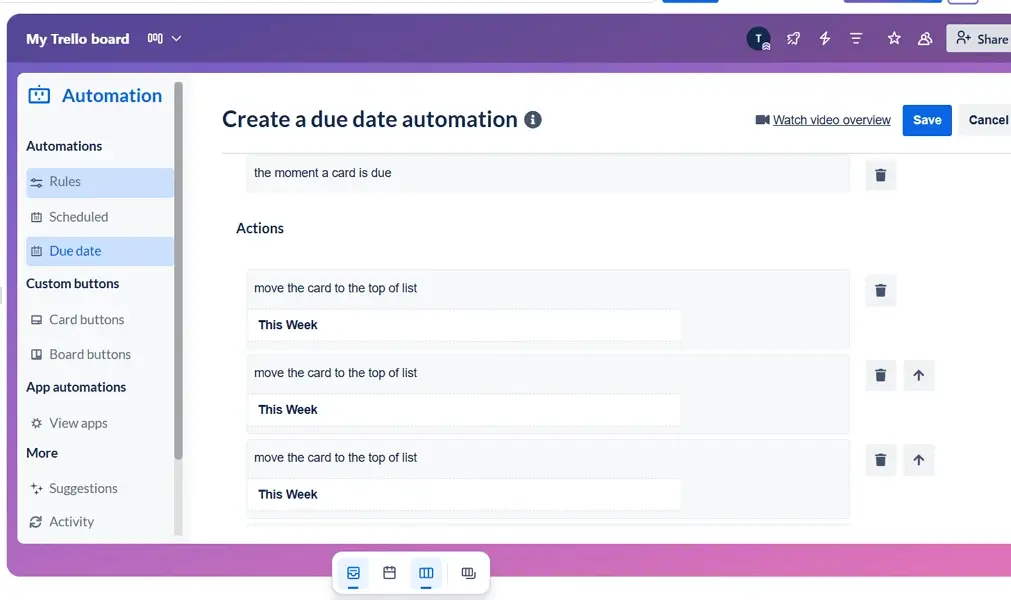
Trello features a built-in automation tool called Butler that lets users create simple, rule-based automations without code. It functions by triggering actions like moving cards, setting due dates, or sending reminders based on card activity.
For instance, you can set rules such as “when a card is moved to ‘Done,’ mark it complete”. This makes it easier to automate routine tasks. It also helps teams stay organized without having to manually manage every update. This is especially helpful for smaller teams that do repetitive tasks.
Asana features a more advanced Rules engine, available on premium plans, that enables users to automate task assignments, status updates, custom field changes, and even Slack or email notifications. This automation feature works across views and workflows, allowing teams to enforce process consistency and reduce manual errors.
This results in greater efficiency and scalability for teams with recurring task patterns or complex approval flows, making Asana a strong choice for structured environments. However, Asana’s automation has a steeper learning curve and may not be ideal for beginners.
Verdict: Trello’s Butler is excellent for lightweight automation that simplifies repetitive tasks in a visual workflow. Asana’s automation is more powerful and scalable, better suited for teams managing standardized processes and multi-step task flows.
4. Time Tracking
Trello and Asana allow teams to track how long tasks take. However, neither tool offers extensive native time tracking on free plans.
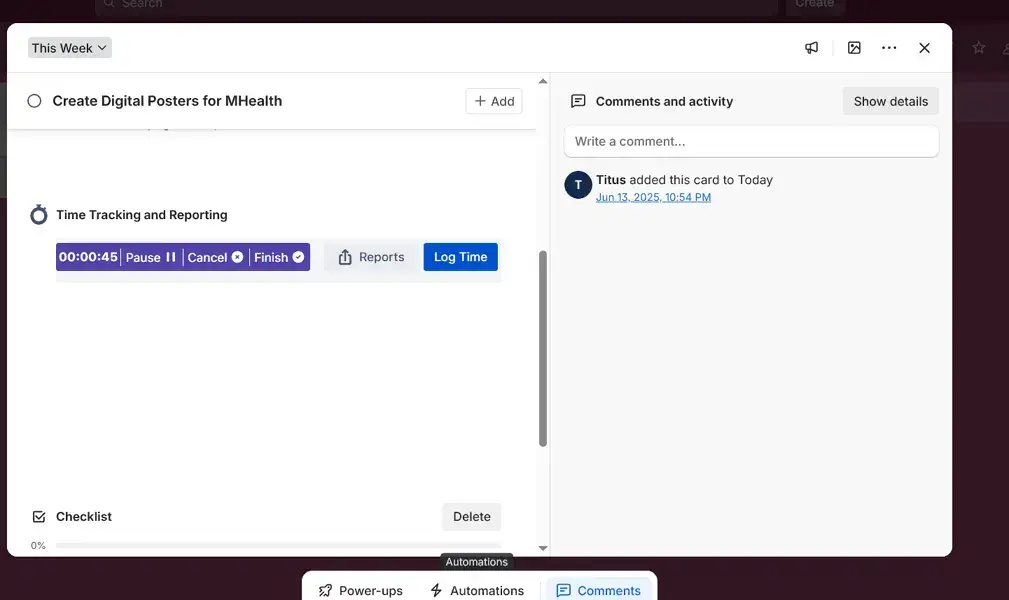
On one hand, Trello lacks built-in time tracking but supports popular third-party integrations from its Power-Ups marketplace. During testing, I used the “Time Tracking & Reporting” Power-Up where I was able to track hours worked automatically or log them in manually. However, these tools (Power-ups) often require separate accounts or subscriptions.
On the other hand, Asana includes native time tracking in Advanced and Enterprise plans. This enables users to record time spent on individual tasks without leaving the platform. Team members can log hours manually or use integrated timers for more precise tracking.
Verdict: Asana leads in time tracking thanks to its native feature, which simplifies tracking, reporting, and billing workflows without using external tools. Meanwhile, Trello is flexible but relies entirely on third-party integrations to achieve similar results, making it better suited for teams already using external time-tracking systems.
5. Team Collaboration and Communication
Both Trello and Asana allow teams to collaborate on tasks, comment on work items, mention teammates, and share attachments. They also integrate smoothly with popular communication, and collaboration tools, where Trello connects with Slack and Zoom through Power-Ups, while Asana connects with other apps through its app suite.
That said, Trello enables team discussions through card comments, mentions, and attachments, allowing teammates to collaborate directly within each task. These comments remain visible to all board members, maintaining transparency. Alternatively, users can use Power-Ups like Google Drive for easy collaboration.
However, Trello doesn’t include chat or video conferencing features, so quick conversations often rely on integrations. It also lacks built-in collaboration docs you are likely to find in project management software, like monday.com.
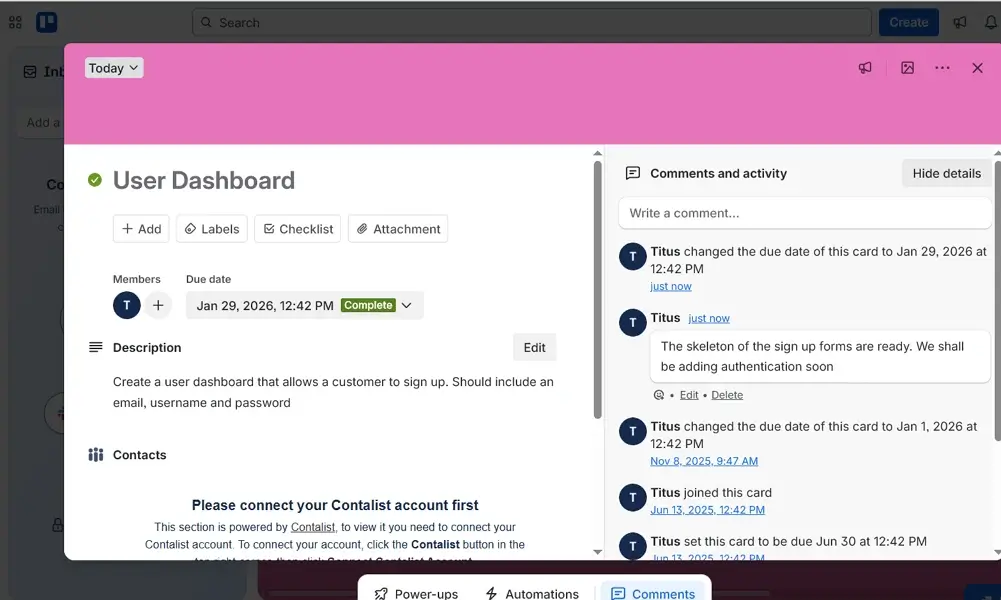
Asana, on the other hand, offers similar comment-based communication within tasks. However, it adds project-level discussions and a centralized Inbox that aggregates updates and mentions across all projects. This structure gives teams better visibility into active conversations. As a result, Asana’s comment threads and message functions streamline context-based collaboration.
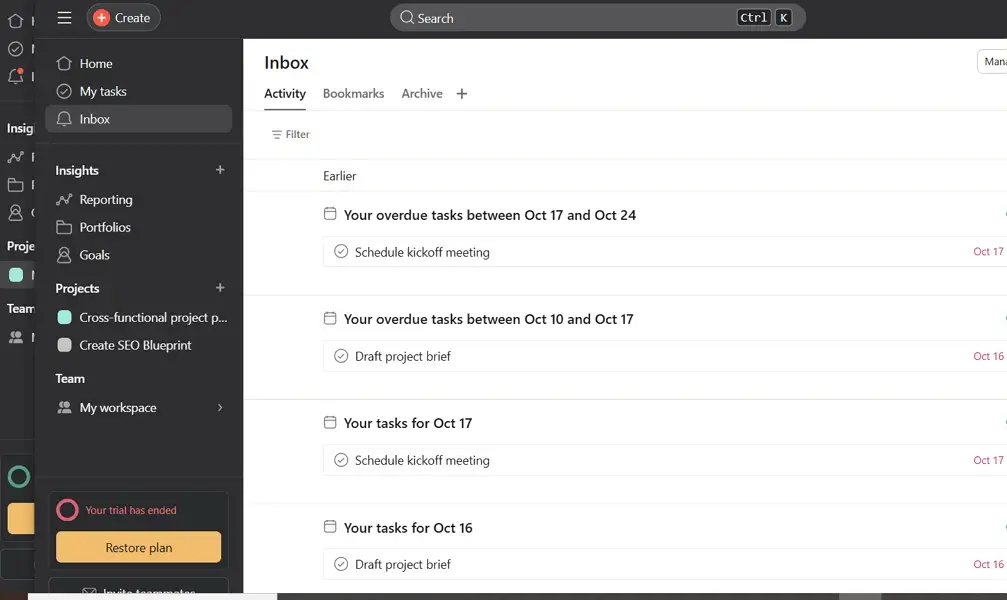
Verdict: Asana’s unified inbox, with discussion threads, makes it a better choice for those who can access all updates in one place. Meanwhile, Trello remains simple and effective for task-based comments but relies more on third-party integrations for team collaboration and richer, real-time communication.
6. AI Capabilities
Both Trello and Asana are enhancing their platforms with AI to simplify task management and boost productivity. These intelligent features help users automate repetitive actions, generate insights, and manage work faster.
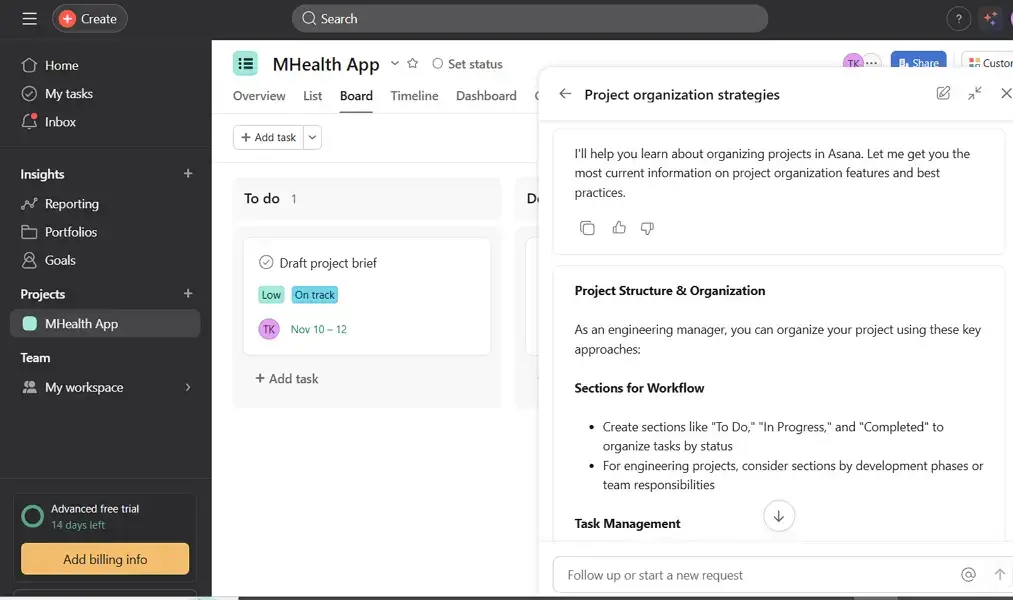
Asana includes robust AI functionality through its Asana Intelligence suite, available in paid plans. Users can generate task summaries, prioritize work, and automate updates. To access Asana AI, click on the icon labelled “Chat with Asana AI” next to your profile picture. During my testing, I found it very useful in helping organize my projects.
Trello uses AI features from the Atlassian Intelligence (AI) suite. This feature is not enabled by default; you have to activate it in Atlassian. You also need a premium plan to use it. During my testing, I found Atlassian Intelligence quite helpful for brainstorming and summarizing ideas and card content.
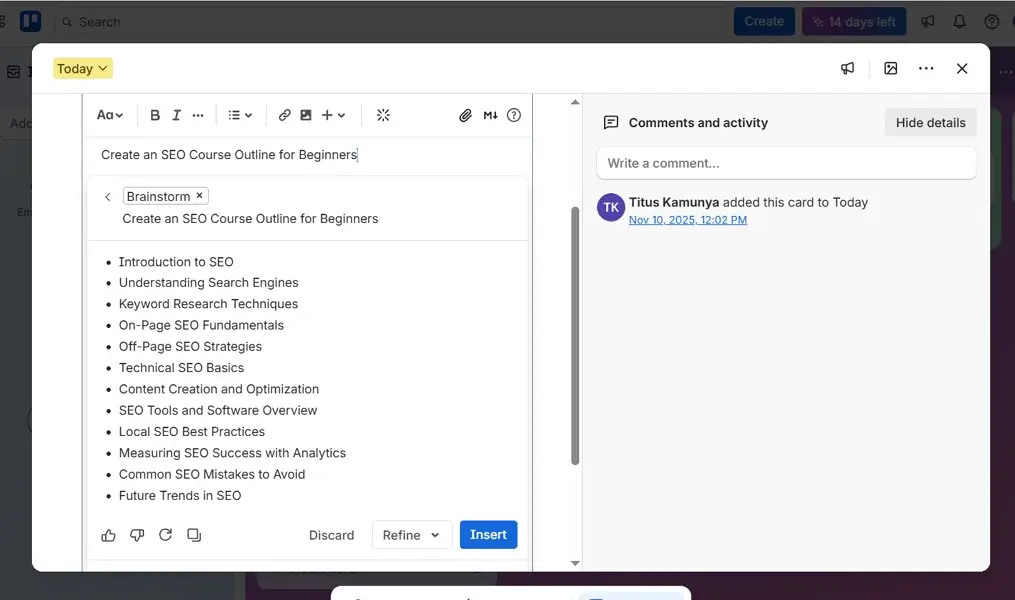
Verdict: Asana takes the lead in AI accessibility as the Asana Intelligence features are automatically available on paid plans, allowing teams to use AI tools instantly. In contrast, Trello’s AI assistant must first be activated through Atlassian Intelligence, adding an extra setup step before users can access its capabilities.
Reporting and Analytics
Both Trello and Asana enable teams to visualize project progress and track performance metrics through dashboards and reports. However, the scope and flexibility of these analytics differ, especially in how deeply users can customize reports.
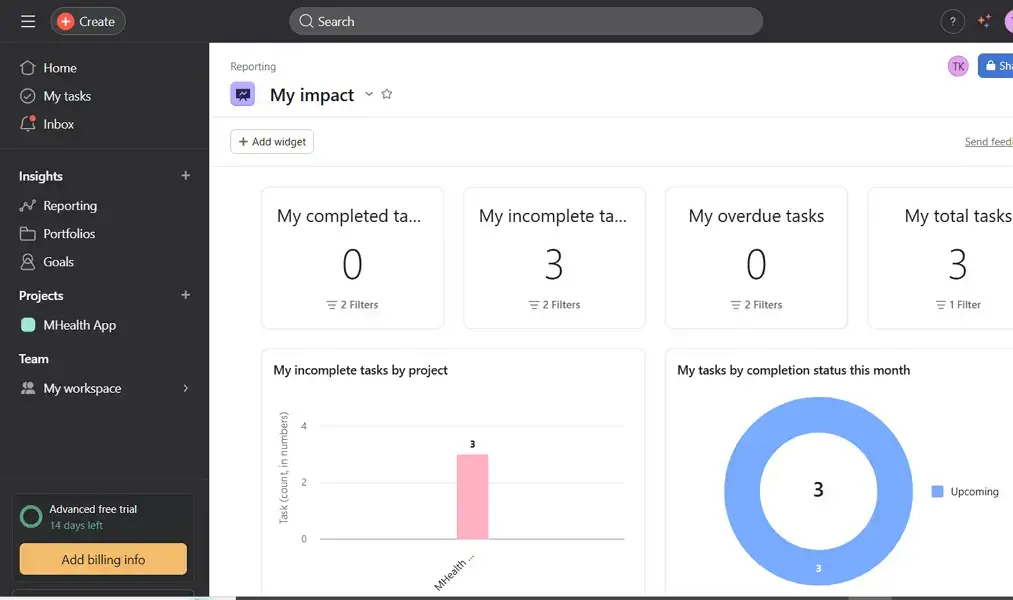
Asana offers built-in, customizable reporting dashboards that provide real-time insights into project health, task completion, and workload balance. Users can create charts, filter data, and share visual reports without leaving the platform. You can also use the Asana Intelligence suite to enhance reporting, summarize trends, highlight risks, and suggest actions based on project data.
Meanwhile, Trello offers basic analytics through its Dashboard view. Alternatively, you can use Power-Ups like GoodGantt for generating Gantt charts. This adds visual summaries and performance tracking. As of this writing, Trello doesn’t include AI-driven reporting but users have the option to use third-party integrations for advanced analytics.
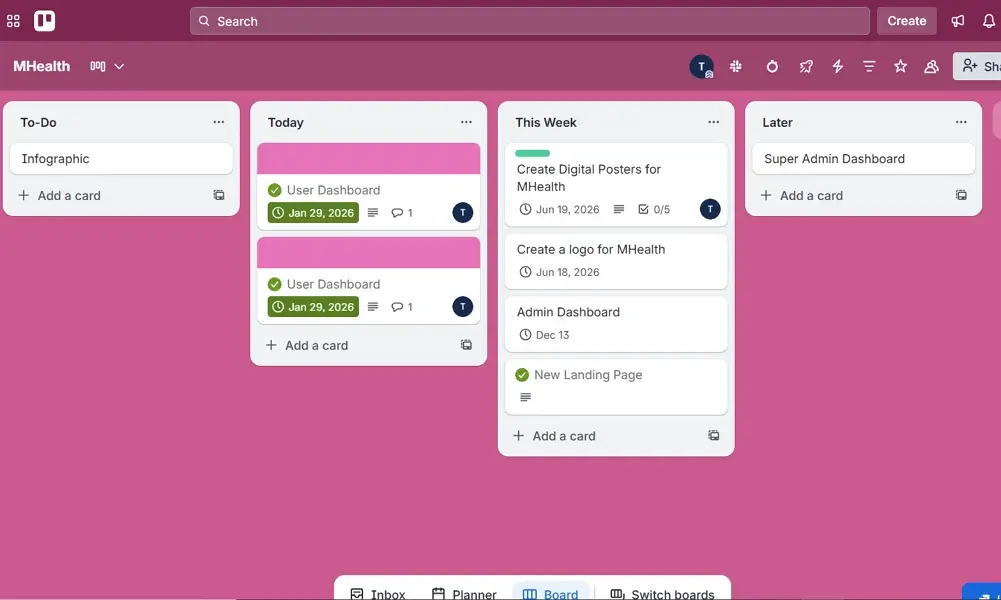
Additionally, Asana allows users to customize dashboards with visual widgets such as charts, graphs, and progress bars, giving teams control over which metrics to monitor. Data can also be consolidated across multiple projects via Portfolio dashboards. Trello offers similar visualization through add-ons but lacks native cross-board reporting. This makes Asana’s analytics more cohesive and easier to scale for large teams.
Asana vs Trello Integrations
Both Trello and Asana integrate with hundreds of popular business tools like Google Drive and Slack. They also connect with other tools through automation platforms like Zapier and Make. These integrations help teams connect communication, file sharing, and scheduling apps to their project boards. However, these platforms differ in how they integrate with other tools.
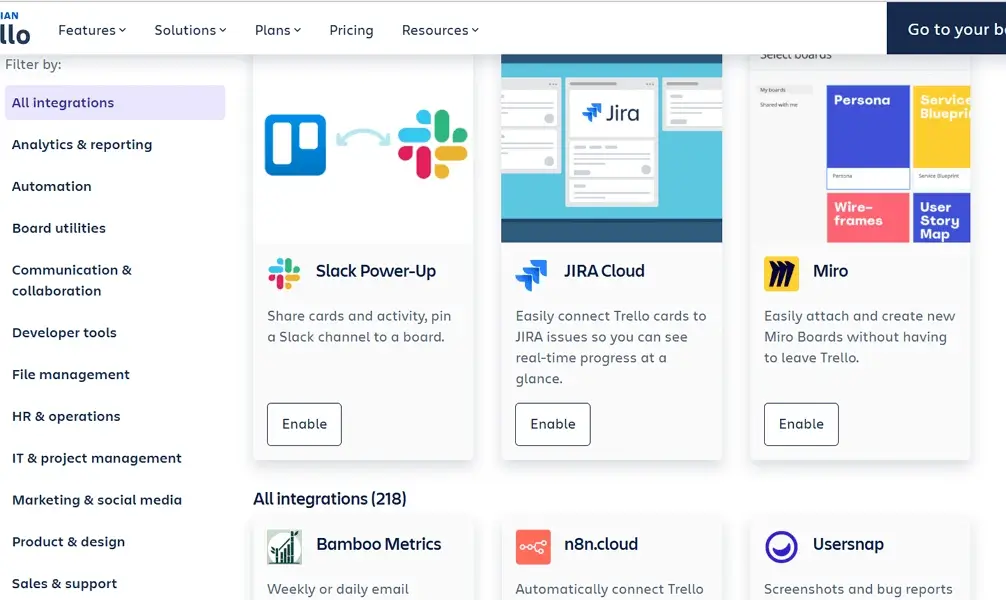
Trello has an integration system called Power-Ups, which allows users to extend Trello’s core functionality by connecting with tools like Google Drive, Slack, Jira, and Dropbox. Users get unlimited Power-Ups per board on the free plan.
Each Power-Up functions as a plugin that adds a specific capability like time tracking, calendar views, and analytics. These Power-Ups allow teams to tailor their workspace to suit their needs without being overwhelmed by unnecessary features.
Asana features native integrations with more than 200 popular tools, including Slack, Zoom, Microsoft Teams, Google Workspace, and Adobe Creative Cloud. These integrations function as embedded extensions of Asana’s task and project management experience.
With these integrations, users can create tasks from emails, attach cloud files, or trigger automations across platforms. Asana also supports custom API access and webhooks for teams building their own tools. Such an approach offers a more seamless, centralized workflow, especially for teams managing multiple apps.
Verdict: Trello’s Power-Ups offer a flexible and easy-to-use integration system that works well for simple or visual workflows. Asana’s native integrations and automation tools make it better suited for teams that rely on connected tools and want to maintain project flow across multiple platforms.
Security and Privacy
Trello and Asana both place strong emphasis on protecting user data through enterprise-grade security and privacy frameworks. Each platform employs encryption, compliance certifications, and access controls to safeguard sensitive project information.
| Security and Privacy Category | Trello | Asana |
| Data encryption | Encrypts data in transit using TLS and at rest with AES-256 encryption | Encrypts data in transit using TLS and at rest with AES-256 encryption |
| Single Sign-On (SSO) | Available on Enterprise plan | Available on paid plans |
| Multi-Factor Authentication (MFA) | Available to all users | Available to all users |
| GDPR Compliance | Yes | Yes |
| HIPAA Compliance | No | Available on Enterprise+ plan |
| Certifications | SOC2 Type II, SOC3, ISO 27001/27018, Privacy Shield, and so much more | SOC2 (Type 2), SOC 3, ISO/IEC 27001:2022, GDPR, CSA STAR Level 1, and many more |
Both Trello and Asana employ strong encryption standards and comply with leading international security frameworks. Asana has its own security and privacy ecosystem, while Trello is part of Atlassian’s larger enterprise infrastructure. Overall, both project management software platforms demonstrate a high commitment to user data privacy and security integrity.
Customer Support
Both Trello and Asana provide multiple support options to help users troubleshoot issues, learn features, and manage their accounts. While both tools emphasize self-service through help centers, their live support availability and response times vary by subscription plan.
| Support option | Trello | Asana |
| Live chat | AI-powered chat that connects to live agents | AI-powered chat that connects to live agents |
| Phone | Not available | Not available |
| Ticket system | Yes, available via Atlassian Support | Yes |
| Knowledge base | Yes | Yes |
| Email support | Available to all users | Available to all users |
| Community forums | Yes | Yes |
| Social media | Yes | Yes |
Both tools emphasize self-service, but Asana’s help center is more comprehensive and beginner-friendly, with searchable guides and video tutorials. Meanwhile, Trello, which is supported by Atlassian, has a broader ecosystem and more active forums.
I tested both platforms and they took me both through AI chatbots before they could register my incident. Both platforms sent me an automated email to acknowledge receiving my case. On Trello, I received live support in less than three minutes and my issues were solved. Meanwhile, I received an email from Asana after almost five hours with guides to help solve my issue.
Wrapping Up: Which one is better, Asana or Trello?
Both Trello and Asana offer exceptional project management capabilities, but they cater to different needs. Trello stands out for its visual simplicity, flexible structure, and affordability. Asana, on the other hand, offers more advanced features, stronger automation, richer integrations, and deeper analytics.
Overall, Asana emerges as the better choice for most project managers and those managing complex projects. Its custom fields, workload tracking, and built-in automation tools make it a powerful project management software for organizations coordinating multiple deliverables. While Trello excels in simplicity, Asana provides the structure, intelligence, and flexibility that growing teams need to plan, execute, and refine their projects efficiently.
If you’re a project manager managing a complex organization like a software development team, Asana delivers enterprise-ready functionality. However, if you prioritize visual clarity, adaptability, and ease of use on basic projects, Trello remains a top choice. Both tools empower teams to manage projects efficiently, thus you choose the one that best fits your workflow and watch your productivity soar.
Trello vs Asana FAQs
What is the best alternative to Asana?
Trello is one of the best alternatives to Asana for teams that prefer a simpler, visual task management system. It’s easier to learn, more affordable, and ideal for smaller teams or individuals who don’t need complex project tracking.
What is the disadvantage of Asana?
Asana’s main drawback is its higher cost and steeper learning curve. Some advanced features, such as workload tracking and AI tools, are locked behind paid plans, which can make it expensive for small teams.
What are the disadvantages of Trello?
Trello lacks advanced features like task dependencies, in-depth reporting, and native time tracking. While great for visual organization, it can feel limited for large teams managing complex projects unless you rely on Power-Ups