




Slack is one of the best communication software built to streamline communication and collaboration. I’ve used Slack for years across different organizations, and its intuitive, well-organized interface always stands out to me. It’s easy to navigate and comes equipped with a variety of communication tools, which keep team discussions flowing effortlessly.
However, despite Slack’s impressive feature set, its cost and pricing structure have been a point of contention for many teams. Some users say Slack is pricey for large teams, while others claim it offers better value for money than other team messaging tools.
In this detailed Slack pricing guide, I’ll lay bare the facts to help you decide which plan suits your team. Whether you’re a freelancer dealing with a few clients or a large enterprise coordinating hundreds of people, I’ve got you covered. I’ll walk you through Slack’s free plan and paid tiers to help you make the right purchasing decision.
Key Takeaways: Slack Pricing Overview
- Slack’s Free plan includes 90-day message history, 10 app integrations, and 1:1 huddles. Try Slack’s free plan today to experience its core collaboration features firsthand.
- Slack’s Pro plan starts at $7.25 per user per month when billed annually. They also offer custom pricing for their Enterprise+ plan. These paid tiers unlock unlimited history, advanced AI tools, enhanced security options, and more administrative controls.
- Slack’s free plan limits searchable message history to just 90 days. For reference, its competitor, Pumble, offers unlimited chat history on its free plan. Also, Pumble’s paid plans start at $2.49 per user per month, billed annually, making it one of the best Slack alternatives for budget-conscious teams.
Slack Features, Benefits, and Shortcomings
Slack is a cloud-based team collaboration tool designed for real-time messaging and file sharing within organizations. It organizes conversations into channels, direct messages, and threads, making it easy for teams to keep discussions structured.
Thanks to its setup, Slack is a perfect fit for remote, hybrid, or in-office teams looking to streamline communication, collaboration, and project coordination. On top of that, its broad app ecosystem and flexible architecture help further simplify and automate digital work.
These are Slack’s main features:
- Messaging: Slack provides persistent chat in channels, DMs, and threads, so teams can centralize communication and easily search past conversations. This, in turn, enables faster collaboration and better transparency. However, Slack messaging can become noisy or hard to organize as teams grow.
- Clips: Record quick audio or video messages in Slack and drop them straight into channels or DMs to get your point across faster. This reduces the need for live meetings and can be a helpful asynchronous communication tool for teams spread across time zones. The only downside to using this is that recorded clips might not feel as personal as live meetings.
- Connect: This feature lets you create a shared channel to streamline conversations with people outside your company, such as vendors, clients, and partners. The invite-only channel lets external collaborators message, start huddles, and share files just like internal teams do.
- Canvas: A persistent “space” within Slack where teams can create and share documents, links, multimedia, and embed workflows. Canvas creates a single place to organize reference material.
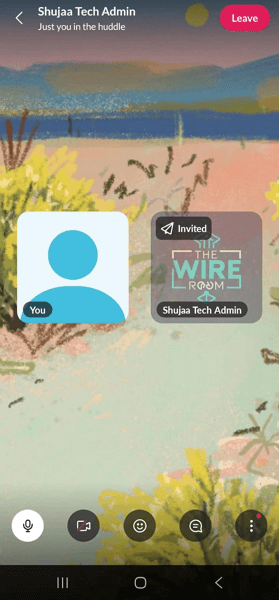
- Huddles: Slack supports instant voice or video sessions launched within channels or DMs, with screen sharing and optional notes to support spontaneous, agile collaboration. However, Slack huddles are pretty basic and lack the bells and whistles you find with dedicated video conferencing software, like scheduled meetings, breakout rooms, built-in whiteboards, and co-annotation tools on shared screens.
- Workflow Builder: A no-code automation tool inside Slack to build workflows, triggers, connectors, and conditional logic. This eliminates routine tasks like sending company information or content to a new team member or asking co-workers for feedback. However, advanced branching functions and integrations may require higher-tier plans or technical setup.
- AI (‘Slack AI’): This lets users leverage generative and intelligent automation to summarize channels/threads, capture meeting notes, search across apps/files, and provide answers from workplace data. This saves time and reduces information overload. However, this feature is available only on paid tiers.
Benefits of Using Slack
While many communication platforms are available today, only a few can match Slack’s speed, reliability, deep integrations, and overall ease of use. These are some of Slack’s key benefits:
- Centralized Communication and Collaboration: Slack centralizes every conversation, file, and project update into one searchable hub. This removes fragmented email threads and scattered chats, giving everyone instant access to the same information.
- Deep Integration with Popular Tools: Slack integrates with more than 2,600 apps, including Google Drive, Asana, Zoom, and Jira. These integrations let teams perform tasks such as file sharing, project tracking, and scheduling without switching platforms.
- Flexible Communication Modes: Slack adapts to your team’s communication style. For instance, teams can hop into quick Slack huddles to solve problems on the spot or drop video clips for async follow-ups. This supports both real-time and asynchronous interactions so that collaboration is smooth across time zones.
- Enhanced Transparency and Accountability: Public channels keep discussions visible to everyone, fostering transparency and cross-team alignment. Meanwhile, features like message threading and searchable archives make it easier to track progress and ensure accountability among team members.
- Intelligent Productivity Tools with Slack AI: Slack AI helps users cut through information overload with features like automatic channel summaries, smart search, and conversational insights. With these, teams can quickly grasp key points or access project details without scrolling through lengthy discussion threads.
Slack Pricing Structure Explained
Slack pricing is simple and flexible. Solo users and small teams can start free to use all the essential communication features. When you outgrow the free plan or need more advanced collaboration features, you can choose between Slack’s Pro, Business+, or Enterprise+ plan.
The good thing is that with the per-user monthly billing, you only pay for what you need. This user-based pricing also makes it easy to scale as your team grows.
Slack Free Plan: Can I use Slack free forever?
Yes, you can use the Slack Free plan indefinitely. The free plan is perfect for individual users or small teams that want to keep communication organized and collaboration flowing at no cost.
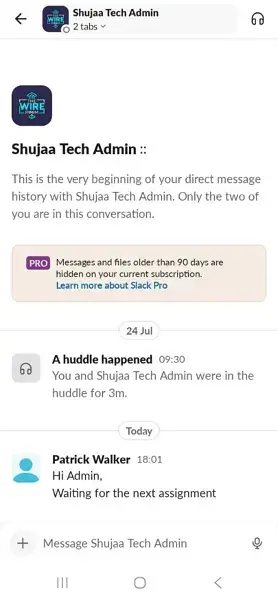
However, the free version comes with certain limitations. For instance, you can only access the last 90 days of message and file history, integrate with up to 10 third-party apps, and facilitate only one-on-one voice or video calls.
To give you a better idea of what you can do with Slack’s free plan, here’s a breakdown of its main features:
- 90-day searchable message and file history: While Slack has an appealing free tier, all messages are only available and searchable for 90 days. This can inhibit proper collaboration and slow down decision-making in teams that often rely on past discussions and shared files to stay aligned.
- Integration with up to 10 apps: You can connect Slack with up to 10 apps from the over 2,600 available in its directory. This can be a major drawback for teams that rely on multiple tools because they can’t fully streamline workflows or automate tasks within Slack.
- 1:1 Audio and Video calls: Free plan users can hold one-on-one huddles, making it easy for distributed teams to connect instantly, clarify questions, and resolve issues in real time. However, without group video calls, teams can’t hold larger meetings or collaborative sessions within Slack, which limits real-time teamwork.
- Private and Public Channels: Admins can create private and public channels to organize workflows or group team members by departments.
- 1:1 Slack Connect: Free users can collaborate with only one external partner or client. This allows freelancers to extend their use of Slack beyond internal teams.
While the Slack free plan is great for small teams, its usage limits can reduce Slack’s effectiveness in daily use. For example, with limited message history, fast-growing teams, project-based teams, or distributed teams working across multiple time zones are most likely to lose important context from previous conversations. Create your Slack free plan here
Slack Pro Plan: Features and Limitations
The Pro plan is Slack’s most affordable paid option, starting at $7.25 per user per month. It’s the natural first step for small teams ready to move beyond the free plan and unlock more powerful collaboration features.
However, the jump from the Free plan to Pro can feel steep for small teams or budget-conscious startups. The good news is that Slack offers a 30-day free trial, allowing teams to explore the Pro plan’s features before subscribing. Some of the notable features on the Pro plan include:
- No Message History Limit: Every message and file remains searchable, so teams never lose context. This supports knowledge retention, faster onboarding, and smoother collaboration compared to the Free plan’s 90-day limit.
- Unlimited App Integrations: Connect to thousands of apps in Slack’s directory, like Google Drive, Asana, Jira, Zoom, and more. This helps teams centralize work tools and automate workflows without constantly switching between platforms.
- Group Audio and Video Calls (Huddles): Host group huddles with voice, video, and screen-sharing. This promotes quick collaboration and replaces many shorter video meetings, saving time and boosting engagement.
- External Collaboration with Slack Connect: Invite up to 250 organizations, clients, vendors, or partners into shared channels for real-time discussions. It keeps group external messages secure, organized, and more transparent than lengthy email threads.
- Basic AI Tools: Pro users get access to AI-powered summaries and search enhancements that retrieve key insights from channels or threads. This reduces information overload and speeds up knowledge retrieval.
Even though the Pro plan offers good features for small teams, it lacks enterprise-grade controls—such as advanced security compliance, audit logs, and centralized user provisioning—which are critical for teams that require more data protection. Slack Pro costs can also rise quickly as more users join, due to Slack’s relatively high per-user pricing.
If cost isn’t a concern and you need advanced compliance, AI, and collaboration tools, you may consider upgrading to higher tiers. But if Slack’s pricing feels steep, check out our Slack alternatives guide for more budget-friendly options.
Slack Business Plus Plan: Features and Limitations
The Slack Business+ plan is designed for medium- to large-sized organizations that need stronger security, admin controls, and guaranteed reliability. It follows Slack’s per-user pricing model: $15/user/month for annual billing or $18/user/month for monthly billing.
Like in the Pro plan, the Business Plus plan has no setup or onboarding fees, and users can start with a 30-day free trial to explore its features before purchasing. Keep in mind that Slack does not offer a formal money-back guarantee, but you can cancel or adjust your subscription before renewal.
In addition to the features you get in Pro, the Business+ plan provides advanced AI and enhanced security, including SAML-based single sign-on (SSO) and SCIM user management. Its advanced security features make it ideal for fast-growing companies that manage complex teams or handle sensitive data.
These are some of the key features:
- Advanced AI: Brings context‑aware intelligence and productivity‑boosting capabilities right into your conversations, helping you communicate better, find what you need faster, and take action, all without leaving Slack.
- Enterprise-Grade Security and Compliance: Users on this plan enjoy SAML-based SSO, HIPAA and GDPR compliance, and certifications such as SOC 2 Type II. This ensures secure, compliant, and centrally managed access while protecting sensitive data and meeting regulatory standards.
- Advanced Admin and User Management: Administrators can manage permissions, provision users through SCIM, and access detailed analytics to monitor workspace activity. This centralizes oversight and reduces manual user management.
- Data Residency and Compliance Controls: The plan allows organizations to choose where their data is stored (in supported regions) and includes audit log APIs for compliance tracking. This is particularly valuable for regulated industries or global teams.
- Data Export of all Messages: Admins and workspace owners can export all workspace data from private channels and direct messages. This makes it easy to generate reports and improve decision-making in any project.
While the Business+ plan works for many large organizations, it doesn’t include features such as multiple SAML configurations, EMM integration support, or native data loss prevention. These capabilities are available in Slack’s Enterprise+ plan, where per-user pricing can quickly escalate for large teams.
Slack Enterprise Plus Plan: Features and Limitations
The Slack Enterprise+ plan is designed for large enterprises that require advanced security, priority support, scalability, and centralized governance across multiple departments or subsidiaries. Unlike lower tiers, its pricing is tailored to each organization’s unique needs, taking into account their team size, compliance requirements, and add-on services.
This tier combines all Pro and Business+ features with enhanced administration and advanced AI capabilities.
These are some of its key features:
- Enterprise Search: Offers powerful, organization-wide search across all connected apps, systems, and databases. Users can instantly find messages and files, improving knowledge discovery and business communication across large teams.
- Multiple SAML Configurations: Supports various SAML setups for organizations operating across different identity providers or subsidiaries like Azure, Okta, and Google. It enhances authentication flexibility while maintaining secure, centralized access control.
- SCIM User Management: Automates user provisioning and deprovisioning via the SCIM protocol, which is vital for maintaining compliance in large organizations. This ensures that employee access is always up-to-date, reducing manual workload and improving security by instantly granting or revoking access as needed.
- Native Data Loss Prevention (DLP): Built-in DLP tools help prevent sensitive information from being shared externally or inappropriately within Slack. This is essential for organizations with strict data-handling and privacy regulations.
- EMM Integration Support: Integrates with Enterprise Mobility Management (EMM) systems to control access to Slack on mobile devices. This protects sensitive data on both company-issued and personal devices.
The Enterprise + plan’s advanced tools make it suitable for large enterprises with complex compliance or data-residency needs. Small teams that require only basic AI functions and security tools may find this particular plan to be very steep.
Another issue is that some features, such as DLP extensions or region-specific data storage, may require additional configuration, which can be challenging to achieve for teams with limited resources.
How to Get Slack at a Cheaper Price
For teams with budget constraints, there are ways to access Slack’s premium features at a fraction of the cost, including:
1. Get Slack for Education Discounts
Slack’s Education Discount provides up to 85% off Pro or Business+ plans for eligible educational institutions. To qualify, your organization must fall into any of the following categories:
- Accredited tertiary, secondary, and primary institutions
- Regional service agencies and school districts
- Nonprofit educational institutions
- Faculty groups, student housing groups, alum associations, athletic associations, financial aid and scholarship organizations, and fraternities and sororities
To claim the education discount, apply through Slack’s Education page and include all required documentation to ensure faster approval.
Once approved, administrators can upgrade their existing workspace to the discounted tier. For example, a plan that costs $7.25 per user per month (annual billing) is reduced to roughly $1.09 per user per month after the discount. The low subscription cost enables universities and student teams to collaborate effectively while staying within budget.
2. Get Slack for Nonprofits Discount
The Slack for Nonprofits program offers free or discounted plan upgrades to eligible charitable organizations. Verified nonprofits with 250 or fewer members receive a free upgrade to the Pro plan, while larger workspaces get an 85% discount on both the Pro and Business+ plans. This ensures cost-effective access to premium collaboration tools and business communication without sacrificing advanced features or scalability.
To qualify, your organization must hold a valid charitable status with any of the following:
- The IRS (in the United States)
- A local tax service/charity commission
- A local TechSoup Global partner
To apply for Slack’s nonprofit discount, submit your application through Slack’s nonprofit portal, where verification is typically handled directly or, in many regions, through TechSoup or a similar validation partner. Once approved, you’ll get an email notification confirming your eligibility for the discount. You’ll also get instructions on how to activate your discounted or free plan.
3. Get Slack Promo Codes and Coupons
In addition to the discounts, Slack occasionally offers promo codes and coupons for first-time users or during specific periods, such as Black Friday and Cyber Monday. As of this writing, it is offering 50% off for three months on the Pro and Business+ plans for first-time users.
Also, from time to time, Slack offers verified partner deals shared through Slack’s official partners or startup programs. However, Slack cautions users to avoid unofficial sources that may distribute expired or fraudulent codes. We recommend that you always verify any discounts or promos by checking Slack’s official channels before applying them at checkout.
What’s the best Cheap Slack Alternative?
If you’re not eligible for the education or nonprofit discount and still find Slack’s pricing high, another option is to consider a more affordable alternative. Pumble stands out as a top Slack alternative, offering a generous free plan with unlimited users and message history.
Read our full Pumble review to explore how the app works, its pros and cons, and how it stacks up against Slack. If you’re short on time, the table below provides a quick comparison.
| Plan/Tool | Slack | Pumble |
| Free Plan | 90 days of message historyUp to 10 integrations Unlimited users | Unlimited message historyUp to 3 integrationsUnlimited users |
| Paid Entry-Level Plan | Pro at $7.25/user/month billed annuallyUnlimited integrationsUnlimited message history | Pro at $2.49/user/month billed annuallyUnlimited message historyUp to 10 integrations |
| Business/Mid-range Plan | Business+ at $15/user/month billed annuallyGroup meetingsSCIM user managementSAML-based single sign-on | Business+ at $3.99/user/month billed annuallySupports guest usersSupports meeting recordingRole-based permissionsUnlimited integrations |
| Enterprise | Custom pricingNative data loss preventionEMM integration supportMultiple SAML configurations | Enterprise at $6.99/user/month billed annually100 GB storage per seatData retentionSingle sign-on |
Pumble clearly leads in affordability, offering similar collaboration and communication features for a fraction of Slack’s cost. Both platforms provide free forever plans, but unlike Slack, Pumble offers unlimited chat history and supports unlimited users, making it more appealing for startups and growing teams. Start Pumble’s free plan today to explore its features, risk-free.
Wrapping Up: Is Slack Worth Paying For?
Slack remains one of the most sought-after, robust team communication platforms, offering flexibility, real-time collaboration, and a vast ecosystem of integrations. Its tiered pricing ensures that businesses of every size can find a plan that aligns with their needs and budgets.
While the free plan offers a strong foundation, paid Slack plans unlock deeper functionality and productivity features such as Slack AI, unlimited chat history, and enhanced security.
For small teams, the Pro plan offers unlimited integrations and chat history, while the Business+ and Enterprise+ plans are ideal for organizations that require compliance, administrative controls, and guaranteed uptime. The flexible per-user model also ensures you pay only for active members, making it easier to scale spending as your team grows.
That said, the Slack pricing plans may feel expensive for freelancers and startups with limited budgets. In such cases, discounted pricing programs or even affordable alternatives like Pumble—which supports unlimited users and free message history—can deliver exceptional value. Ultimately, Slack is worth paying for if your organization depends on efficient business communication, secure messaging, and integrated workflows.
Slack pricing: FAQs
How much does Slack cost per user?
Slack’s paid plans cost $7.25 per user per month for Pro and $15 per user per month for Business+. There is also an Enterprise+ plan with custom pricing.
Can I video call on Slack?
Yes. Slack supports 1:1 video calls on the free plan and group video calls on paid tiers.
How much is the Slack Pro plan?
Slack’s Pro tier costs $8.75 per user per month when billed monthly, or $7.25 per user per month when paid annually. You can easily upgrade your Slack account to the Pro tier directly from the workspace billing page.
How many people can use Slack for free?
There is no set limit on the number of users you can invite to a Slack workspace on the Free plan. While the user count is unlimited, the Free plan limits message history to 90 days of searchable history and caps it at 10 app integrations.