





Ever had a meeting end just as the brainstorming finally hit its stride? This is the reality with most free video conferencing tools — Zoom cuts you off at 40 minutes while Microsoft Teams give you only an hour. For growing teams and remote businesses, that time limit can be counter-productive and make collaboration frustrating.
The good news is that better options exist. You can now find free video conferencing tools with no time limit that delivers smooth, secure, and professional virtual meetings without the constant pressure to upgrade. These tools are built for long strategy calls, creative sessions, and all-hands meetings that shouldn’t be cut short by time limits.
In this guide, I’ll highlight the best free video conferencing tools for 2026 that let you meet, plan, and connect for as long as you need. These platforms prove that great communication doesn’t have to come with a time cap or a paid plan.
Key Takeaways
- Jitsi Meet is one of the best free video conferencing tools with no time limits: It lets you start instant, secure meetings from any browser with no sign-up or installation required. Its open-source design ensures transparency and privacy for every call. Start a free Jitsi Meet session, and collaborate without restrictions.
- FreeConferenceCall.com is the best platform for hosting large group meetings: It supports up to 1,000 participants with no time limits, making it perfect for webinars, classrooms, and nonprofit events. Create a free account, and start hosting large meetings today.
- Google Meet is the best option for one-on-one video conferences: Its free version offers unlimited calls, crystal-clear audio and video, and built-in AI features like live captions. Create a free account on Google Meet, and enjoy seamless professional conference calls right from your browser.
Our Pick: Jitsi Meet is the best video conferencing platform with no time limits
Jitsi Meet takes the top spot because it delivers everything teams need for seamless, secure, and unlimited online meetings without asking for a cent. It’s open-source, simple to use, and offers reliable, high-quality calls that never time out. Whether you’re running client sessions or team check-ins, Jitsi Meet guarantees flexibility and freedom from restrictions.
The unlimited meeting duration on the free version is one of its major selling points. Unlike Zoom or Microsoft Teams’ timed sessions, Jitsi Meet imposes no caps at all. Users can host calls for hours without interruptions, making it ideal for remote teams, online workshops, or academic discussions that require uninterrupted collaboration and deep focus.
Lastly, Jitsi Meet is browser-based. This means you can join meetings instantly through any web browser and there are no downloads, sign-ups, or extensions required. This ease of access reduces friction for guests and clients, helping teams start calls faster and maintain a professional, seamless meeting experience across devices.
List of Free Video Conferencing Platforms with No (or Generous) Time Limits
Let’s explore the best free video conferencing tools that let you meet as long as you need. Each of the tools below offers unlimited or extended meeting durations, reliable performance, and essential features to support remote work. These picks cover every type of virtual meeting need, regardless of whether you want a quick, no-sign-up option, or a secure platform for team collaboration.

Quick and no-account needed meetings
- Free plan: Yes with unlimited meeting duration for group and one-on-one meetings
- Free trial: No
- Pricing: Starting from $99/month
Pros:
- No participant and time limit on meetings
- No downloads required as it is browser-based
- End-to-end encryption for security and privacy
Cons:
- Video quality may vary depending on internet conditions
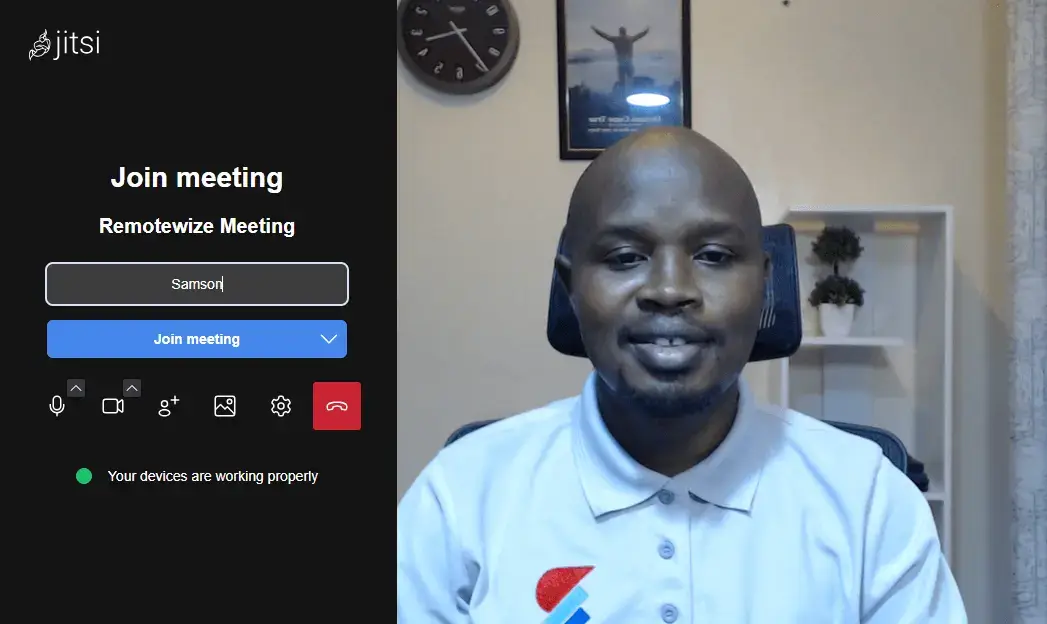
Jitsi Meet is a powerful, open-source video conferencing tool that offers unlimited meetings without restrictions. Its open architecture lets businesses host their own servers, customize security, and maintain full data control, something most free platforms can’t match. This makes Jitsi a great choice for privacy-focused teams that need flexibility and independence in their communication setup.
Its browser-based design removes the need for installations. You can launch meetings instantly by sharing a link, and anyone can join from any device. This simplicity keeps team collaboration fast and friction-free, ideal for remote teams or startups that value efficiency over complexity. Jitsi’s no-limit, no-login setup truly redefines convenience in free meetings.
Other Things I Liked About Jitsi Meet
- Live Streaming on YouTube: Jitsi Meet allows you to link your meeting to YouTube live streaming. This enables users to broadcast to a wide audience.
- Tiled Video Layout: Jitsi Meet displays all participants clearly on one screen. It makes team discussions more natural and visually organized.
- Connect with Calendar Apps: Connect Jitsi Meet with your Google Calendar and make scheduling a breeze. This ensures that you never miss a meeting.
If you ever outgrow the free tier — say you need embedded APIs or advanced analytics — you can opt for Jitsi as a Service (JaaS). This is inclusive of unlimited meeting minutes on up to 25 endpoints for free, then paid tiers as your usage scales. Paid plans start from $99/month for 300 users.

Always-on communication for official and casual meetings
- Free plan: Yes with group meetings with up to 25 members and no time limit
- Free trial: No
- Pricing: Starting from $2.99 monthly or $29.99 yearly
Pros:
- No time limit for one-on-one and group meeting
- Supports live streaming and video chat simultaneously
- Always on-voice channels for quick calls
Cons:
- Interface can feel cluttered for first-time users
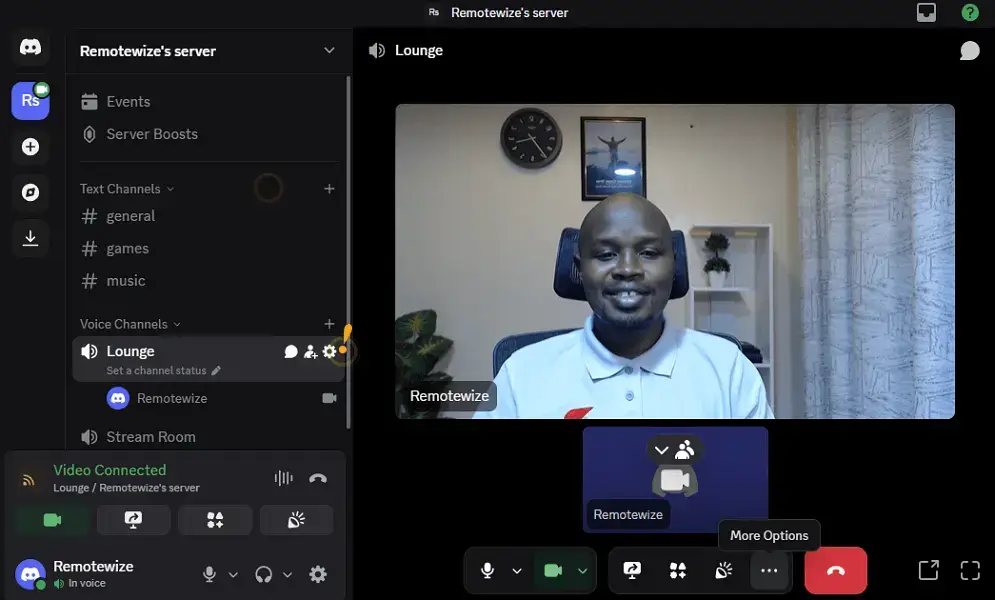
Discord combines video, voice, and chat in one platform so teams can stay connected all day. There’s no automatic cut-off in group meetings that can hold up to 25 participants on its free version. The always-on voice channels means you can drop in or out of discussions without scheduling. This makes it perfect for small teams that value flexibility and spontaneous collaboration.
Also, Discord has Simultaneous Video Chat + Go Live Streaming capability. You can keep your camera on while sharing your screen or streaming content live in the same session. This makes meetings more interactive and personal, and ideal for demos, remote workshops, or client check-ins where both face-to-face and content sharing matter.
Other Things I Liked About Discord
- Bots and Custom Integrations: Discord supports hundreds of free bots that automate workflows, and schedule meetings. It also integrates with tools like Google Calendar, Trello, and GitHub. These bots and integrations help teams streamline communication and manage tasks within the workspace.
- Unlimited Servers and Channels: You can create multiple servers, where each has dedicated text, voice, and video channels to organize discussions by project, team, or department. This structure keeps communication clean and scalable as your organization grows.
- Rich Media and Screen Collaboration: Discord’s video channels support high-quality streaming and allow quick media sharing like files, images, and live demos. It’s a simple way to brainstorm ideas or present visual work without switching platforms.
Discord’s core features like unlimited video and voice calls are completely free for all users. However, if you decide to upgrade, the Nitro Basic plan starts at $2.99/month, offering perks like increased file upload limits to 50MB, and enhanced streaming. You can also opt for the Nitro package at $9.99 for more perks.
You can check out our Discord pricing guide for more details.
No-download one-on-one video meetings
- Free plan: Yes with one-on-one meetings with no time limit and group meetings capped at 60 minutes
- Free trial: Yes. A 14-day trial for premium features through Google Workspace
- Pricing: Starting from $7/user/month through Google Workspace
Pros:
- No time limit on one-on-one calls
- Browser based/ no download needed
- Automatic noise suppression
Cons:
- Group meetings capped at 60 minutes on the free tier
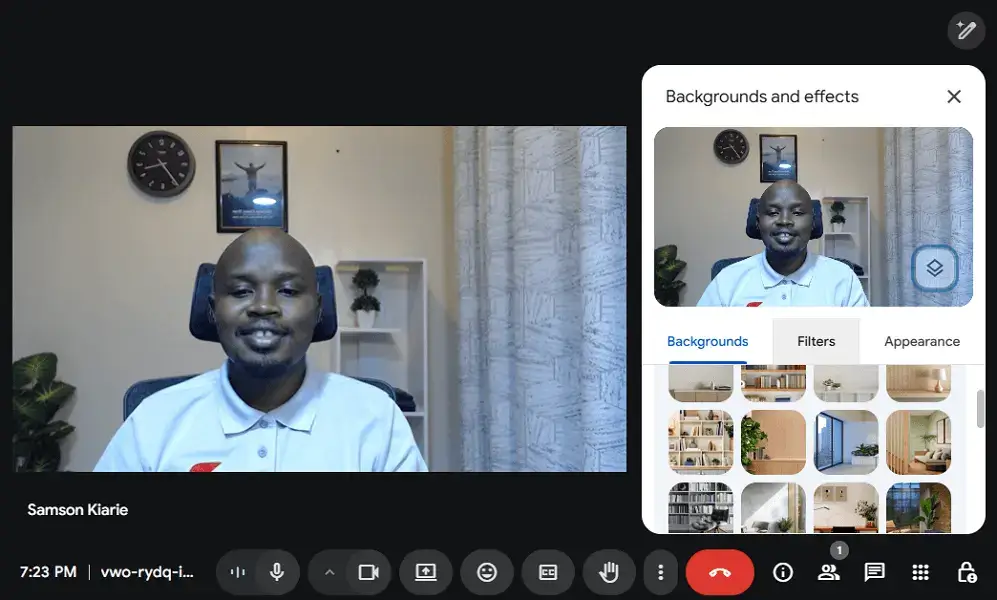
Google Meet stands out for its reliability and simplicity. The free tier allows you to hold one-on-one meetings with no time limit, making it ideal for client consultations, mentoring sessions, or long interviews. It’s accessible directly from your browser, so there’s no software to install or complicated setup required.
Google Meet also shines for its AI-powered video and audio optimization. The platform automatically adjusts brightness and filters background noise to keep you looking and sounding professional, even in low light or busy environments. During testing, this feature consistently improved clarity, making it perfect for professionals who work remotely or travel frequently.
Other Things I Liked About Google Meet
- Gmail and Google Calendar Integration: Users can launch or join meetings directly from Google Calendar or Gmail. This streamlines scheduling for busy professionals.
- Companion Mode: You can use one device like a laptop for video and another one like a tablet for chat, polls, or Q&A without distractions.
- Live Captions: Real-time captioning powered by Google’s speech recognition. This improves accessibility and understanding during calls.
Google Meet’s free tier includes unlimited one-on-one meetings and 60-minute group calls for up to 100 participants. When you outgrow the free plan, Google Workspace paid tiers start at $7 per user/month, unlocking features like meeting recording, bigger duration of group meetings, and larger participant limits.

Untimed one-on-one and group meetings
- Free plan: Yes with no time limit for one-on-one and group meeting
- Free trial: Yes for 5 days
- Pricing: Starting from $6.99 /licence /monthly for the Pro plan
Pros:
- No time limits on the free plan even for group meetings
- Includes 256-bit encryption for all meetings by default
- Includes polls even on the free tier
Cons:
- Displays ads on the free tier, which may feel less polished in a business set up
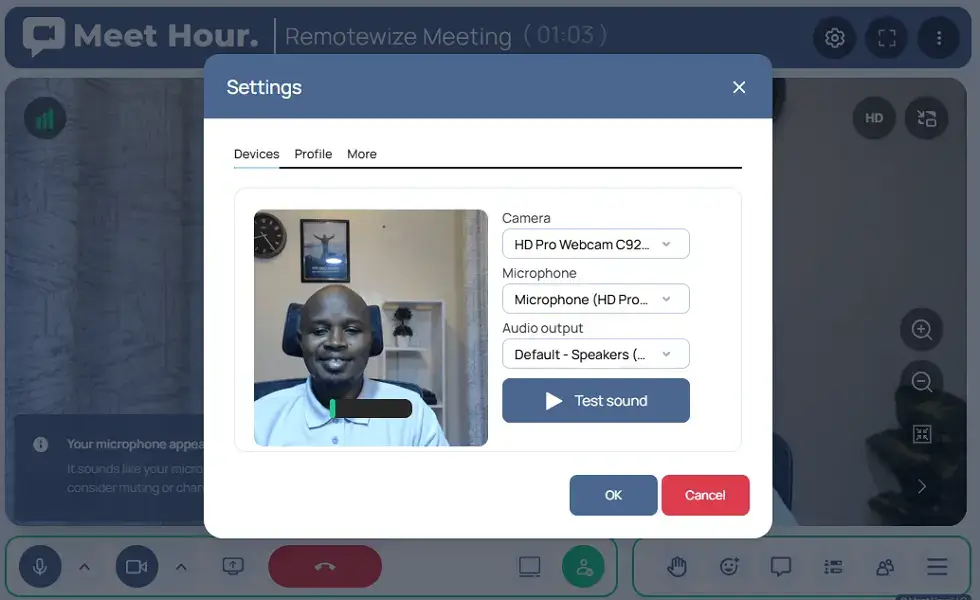
Meet Hour’s standout advantage is its unlimited meeting duration on the free tier for both one-on-one and group calls. You can hold discussions, workshops, or long client sessions without worrying about time limits. This makes it perfect for teams and startups that rely on consistent, interruption-free collaboration throughout the workday.
Lobby Mode on Meet Hour lets hosts approve participants before they enter a meeting. This gives you full control over who joins your call, minimizing disruptions and ensuring privacy. It’s especially useful for online classes, large business meetings, or consultations where sensitive information may be shared.
Other Things I Liked About Meet Hour
- Polls: Meet Hour allows users to create polls to collect data or opinions during meetings. This makes it a good option where user feedback or insights are needed.
- 256-bit end-to-end encryption: All meetings are secure by default. This makes Meet Hour particularly suited for professionals handling private discussions.
- Multi-platform Access: You can join meetings from the desktop app, mobile app, or even direct from the browser. This makes Meet Hour ideal for remote teams.
Meet Hour’s free plan is generous with unlimited meeting time, up to 100 participants, and core features like encryption, screen sharing, and virtual backgrounds. When you outgrow the free tier, paid plans start at $6.99/ license/month, unlocking features like branded rooms, virtual whiteboards, higher participant limits, and analytics.

One-on-one and group meetings with no time limit
- Free plan: Yes with group meetings with no time limit
- Free trial: No. All the premium features are available on the free tier
- Pricing: Starting from $39/year

Pros:
- No time limit for one-on-one and group meeting
- Supports up to 1000 participants on the free plan
- Offers cloud recording on the free plan
Cons:
- User interface doesn’t feel attractive compared to modern platforms
FreeConferenceCall.com is one of the most generous free video conferencing solutions available. It allows unlimited meetings with no time restriction, and supports up to 1,000 participants. This makes it perfect for nonprofits, schools, and large organizations that need to host webinars, training sessions, or community events without worrying about time or participant limits.
Its cloud recording and playback feature lets you capture entire meetings and store them for later review. You can share a playback link or download recordings for documentation or training purposes. This is especially useful for recurring updates, remote learning, and teams that need to review project discussions after each call.
Create a free account, and start hosting large, reliable meetings today.
Other Things I Liked About FreeConferenceCall.com
- Waiting Lobby: Participants can wait in a virtual holding room until the host admits them. This lobby keeps the meeting organized and adds privacy for educational or professional sessions.
- Meeting Drawing Tools: FreeConferenceCall.com comes with a digital whiteboard you can use for illustrations and annotations. Users can brainstorm ideas or highlight key discussion points in real-time.
- Meeting Reports: Meeting hosts can collect contact information for each participant and stats like how they interacted. This is useful in decision making and gauging whether the meeting goals were met.
Most of FreeConferenceCall.com’s core features like unlimited conferencing and HD audio and video are free. However, if you need features like more cloud storage or dedicated support, you may want to consider upgrading to their paid tiers, which start at $39/year.

Secure, one-on-one and small group video calls
- Free plan: Completely free
- Free trial: Not applicable since it is free
- Pricing: Completely free but accepts donations

Pros:
- End-to-end encryption by default
- Completely free
- No time limit on one-on-one and group calls
Cons:
- Limited to 50 people on group calls
Signal fits users who prioritize privacy without sacrificing call quality. All video and voice calls are protected with end-to-end encryption, ensuring that only authorized participants can access the conversation. Signal supports unlimited call duration, making it ideal for confidential business meetings, interviews, or one-on-one sessions where discretion is essential.
Signal is also known for its small-group video calling performance. It supports up to 50 participants with high-definition video, maintaining clarity even on mobile networks. During testing, call quality remained consistently smooth, proving that privacy-focused tools can still deliver professional-grade communication. This makes Signal a solid choice for remote teams, journalists, and consultants who value confidentiality.
Other Things I Liked About Signal
- Disappearing Messages: Users can set messages and shared content to auto-delete after a chosen time. This keeps communications clean and private.
- Signal Groups: Users can create groups with up to 50 members. This makes it easy to create communities for quick meetings.
- No Ads or Trackers: Signal doesn’t display ads or install trackers like most free alternatives do. This means you are guaranteed that your data is always secure.
Signal is completely free to use with no hidden tiers, ads, or premium upgrades. The platform is funded by donations through the Signal Foundation, ensuring its mission remains focused on privacy, not profit.

Privacy-focused, no account needed, no download meetings
- Free plan: Yes with no time limit on group meetings with up to 4 members
- Free trial: Yes for 7 days
- Pricing: $5.83/month for the Premium plan
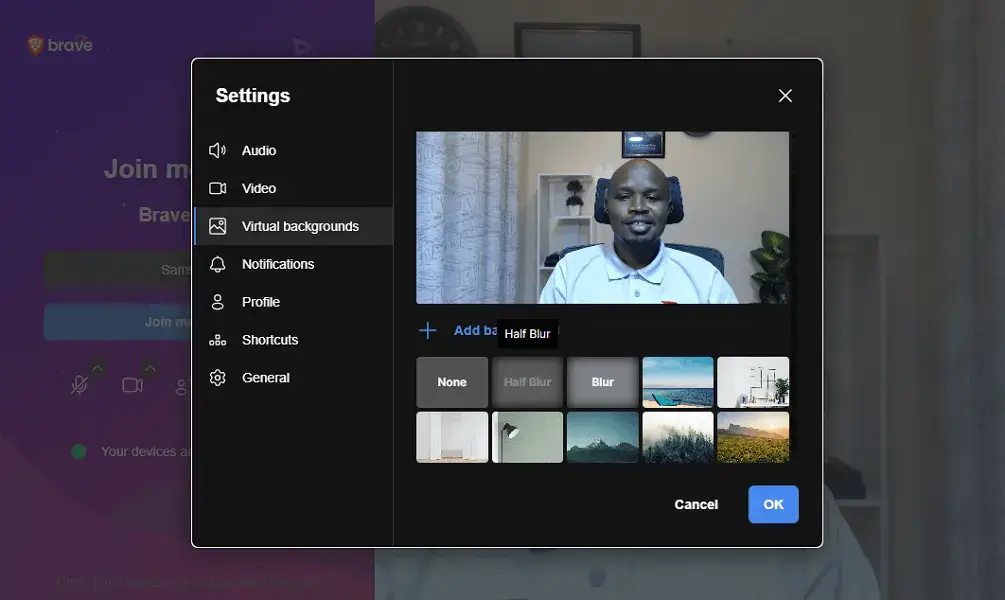
Brave Talk is a browser-native video conferencing tool. The free tier doesn’t impose time limits for one-on-one and group meetings with up to 4 members. It runs entirely within the Brave browser, letting users start secure calls instantly without creating an account or installing software. This simplicity makes it perfect for freelancers, clients, or professionals who need quick, private conversations.
Brave Talk allows moderators or event hosts to broadcast their meetings to YouTube. This is especially useful for educators, content creators, or teams running online sessions for larger audiences. It combines Brave’s privacy-first design with YouTube’s massive reach.
Other Things I Liked About Brave Talk
- Integration with Brave Browser: Brave Talk is within Brave browser, a privacy-first browser known for its high performance and automatic tracker protection.
- Participant Privacy Controls: Hosts can mute others, lock rooms, or manage screen sharing to prevent intrusions.
- Breakout Rooms: Brave Talk allows moderators to create breakout rooms, a feature mostly locked behind paywalls on other tools. This feature makes Brave Talk a good tool for mass interviews or brainstorming sessions.
Brave Talk Free offers unlimited one-on-one meetings and basic moderation tools at no cost. When you outgrow the free plan, Brave Talk Premium starts at $5.83 per month, allowing users to hold group meetings with more than 4 members, enjoy cloud recording, and advanced moderation.
Potential Limitations of Free Video Conferencing Tools
Even the best free video conferencing tool has a few limitations to consider. Here are the most common trade-offs you may encounter:
- Lower Capacity Caps: Even though some platforms like Discord provide group meetings with no time limit, they cap the attendees number to just 25 members.
- Limited Advanced Features: Free plans often exclude extras like analytics, detailed reports, or meeting transcriptions. These tools are great for communication but may lack insights for performance tracking or management.
- Dependence on Internet Quality: Some free platforms sometimes rely on shared servers with fewer performance optimizations. This can result in occasional lag, dropped calls, or reduced video quality during peak usage times.
- Basic Customization Options: Branding tools, like adding a company logo, custom meeting links, or personalized backgrounds, are mostly reserved for paid tiers. This can make free platforms feel less professional in business settings.
Wrapping it Up: Host Longer Meetings for Free
Free video conferencing tools have come a long way as they offer unlimited meetings with no time limit, high-quality calls, and reliable performance without forcing you to upgrade. Whether you’re hosting team stand-ups, online classes, or client sessions, there’s now a free platform to match your needs and help you collaborate without the pressure of a timer.
These free video conferencing tools with no time limit prove that great communication doesn’t have to come with a price tag. Each one on this list offers unique strengths; from Jitsi Meet’s open-source flexibility to Brave Talk’s privacy-first approach, ensuring you can find the perfect fit for your workflow.
Which of these tools have you tried so far? Do you prefer the flexibility of Jitsi Meet, the community feel of Discord, or the privacy of Signal? Share your experience in the comments as we’d love to hear what works best for you.
If your team is ready to move beyond meetings and improve daily collaboration, check out our guide on the 10 Best Communication Software for Small Teams to explore platforms that streamline messaging, file sharing, and team management.
Which video call app has no time limit?
Several platforms let you host video meetings with no time limit. Some of the notable ones include Jitsi Meet, FreeConferenceCall.com, and Meet Hour. These tools offer reliable video and audio performance, secure screen sharing, and flexible free plans that support both one-on-one and group meetings without restrictions.
What is the free alternative to Zoom without time limit?
Jitsi Meet is one of the best free alternatives to Zoom with no time limit. It’s a browser-based video conferencing platform that requires no downloads or sign-ups.
How to get unlimited time on Google Meet?
Google Meet offers unlimited one-on-one calls on its free plan, but group meetings are limited to 60 minutes. To get unlimited time for all calls, you can upgrade to a Google Workspace subscription, which also adds meeting recording, expanded cloud storage, and other premium video conferencing tool features.
Is there a time limit for video conferencing?
It depends on the video conferencing platform you’re using. Some tools like Google Meet limit meeting duration on their free version, while others like Jitsi Meet and FreeConferenceCall.com let you host online meetings with no time limit. Always check the plan details to ensure it fits your usage and team size.